Saturday, January 25, 2014

Januray Love It & List It Link up: Social Skills


This month's link up from Jenna at Speech Room News is about your favorite social skills activities. I don't do very much in the line of social skills but below are my top 3 go to products.

1. Superflex A Superhero Social Thinking Curriculum created by Michelle Garcia Winner and Stephanie Madrigal. This activity contains a story and activites targeted for elementary age students. The story is great, the students don't even realize they are learning.


2. Sorry for Social Skills-a TPT product I created to target middle school and high school students. This activity is based on the board game Sorry and contains game cards with scenarios on them. The students must answer the question correctly to move their game piece. Find the activity in my TPT store here.

3. Learn to Respond Appropriately by Natural Learning Concepts. These cards have pictures on one side and questions on the other. The goal is to have the students come up with appropriate responses to the scenarios presented in the pictures.

What are your favorite social skills products?

Breana

Wednesday, January 15, 2014

Answering TherAppy app review!!!

I love my Tactus TherAppy apps. They all provide such comprehensive settings so you can set them for many different levels of play, both children and adults benefit from these apps. When I received my copy of Tactus Therpays newest app, I couldn't want to start playing with it.

When you first open this app you see a long menu (pictured below). First you enter the students name and set their profile for play in both wh-questions and yes/no questions, which are separated in different sections. I love that you can select if you want a male or female voice to read the questions and how fast the voice will speak. You can also pick how many questions (trials) you want the client to have. I tend to select all just so I don't run out of questions. The therapist can also select if they want their client to receive motivational messages, audio reinforcement, auto advance (slide progresses by itself), and whether clients can select outside links on the home screen.


The second part of this window allows the therapist to set specific information for each type of question.
 
 
There must by endless possibilities of setting configurations and without a doubt this app can be used with a patient/client/student of any age.  
 
In the settings for WH questions, the option for a Receptive Response mode, the student get to select their answer from a field of 2-4 answers based on level of difficulty. For Expressive Response mode, the student must answer the question for themselves and the therapist can record the response as correct, approximation, or incorrect.
 
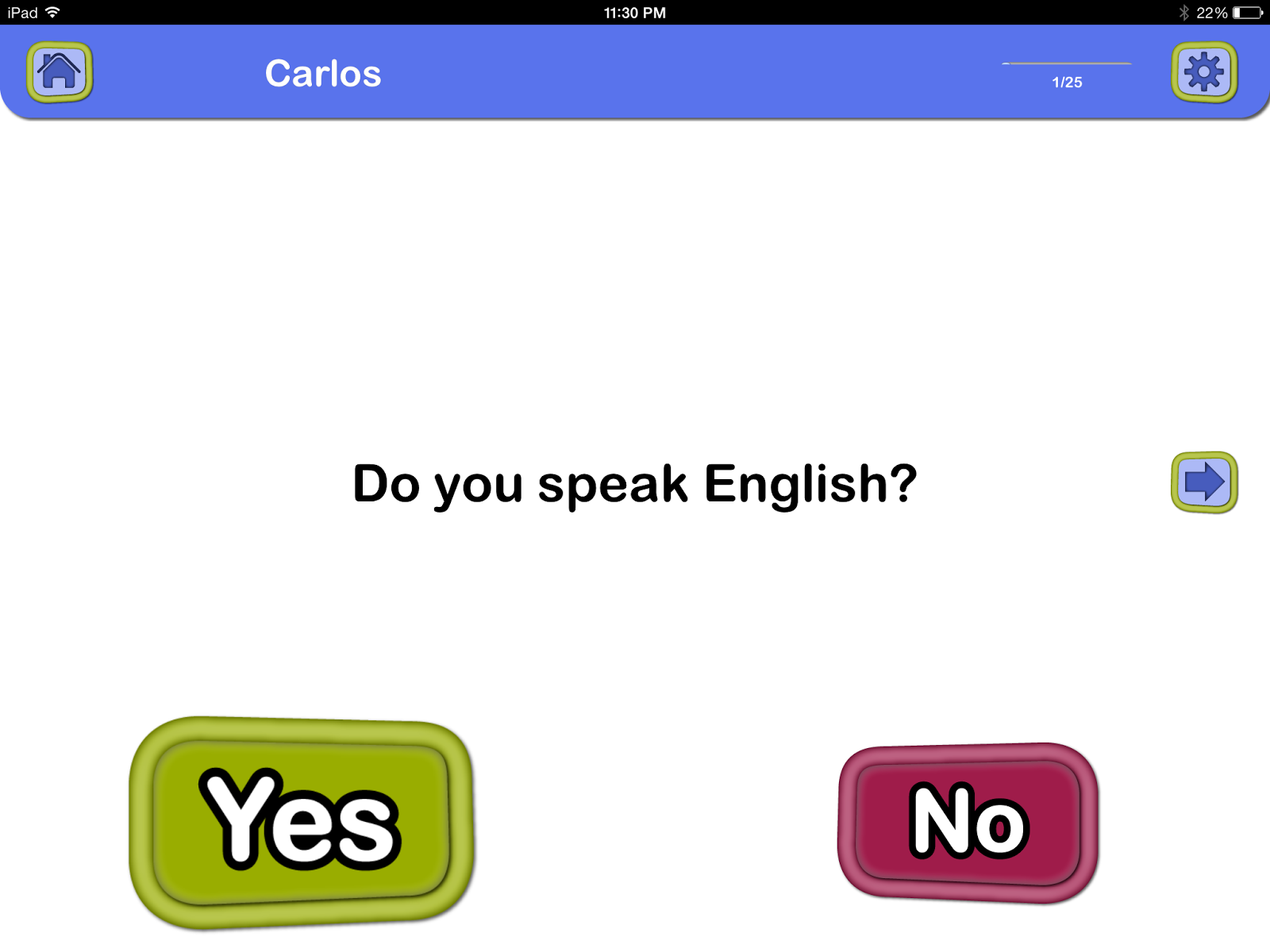
Below are sample question pages:


I love that the app reads the question for the student and does not read the answers unless the megaphone next to each answer is touched. This gives my students the choice to try and read the answers themselves for extra reading practice or get a little help. 
 
Pros:
  • The voice reading the questions and answers can be adjusted for speed and can be made male or female
  • The question and answer is repeated before moving on to the next question
  • Uses both questions and questions with visuals for students with receptive and/or expressive needs
  • Begins speaking automatically after switching to next slide
Cons:
  • A few random words were pronounced incorrectly (some of my students had trouble understanding a different pronunciation)
Tactus Therapy also released another app set up very similarly called Asking Therapy where students are given part of the answer to a question and have to develop the question. I would highly recommend both apps.
 
Breana 

The opinions in this review are mine and only mine. I was provided a copy of this app and no other compensation.

Saturday, January 4, 2014

Gluten Free Menu at Cheesecake Factory!!

Disclaimer: The menu may have been edited since this post was published.

I recently heard that Cheesecake Factory was re-releasing a fairly large gluten free menu. I was surprised at the multi-page menu that was provided when I asked. I was also surprised how knowledgeable the server was when I asked questions about food preparation protocol. I have learned the hard way in the past that asking how pasta is prepared (checking for use of separate pasta water) can be the difference between sleeping at night and being up sick. I loved my food, see the pictures below, although it was a little dry I would still eat it again. I had a great experience with this specific location, luckily it's near my house, and I would have no problems going back.

This is the menu I got at my location, I cannot guarantee it is the same at all locations. If you get a different menu, please leave a comment and let everyone know what you noticed.


This is the picture on the back of the menu, I forgot to take a picture of my actual cheesecake. It is the Godiva Chocolate Cheesecake and it was really good.

 
This is a picture of my actual food. I had Evelyn's Favorite Pasta.
Hope you enjoy a great meal!
Breana


Wednesday, January 1, 2014

Happy New Year!!!

Happy New Year to all of my followers!!! Don't forget to invite your friends to follow on the blog or the new facebook page.


Breana

Tuesday, December 31, 2013

Healthy and Simple Roasted Vegetables!

I love making easy and healthy recipes. This recipe for roasting vegetables can be done with whatever vegetables are in your fridge. This time I did a combination of brussel sprouts and cauliflower.

To make the recipe reflected in the picture I cut the brussel sprouts in half and sliced the cauliflower so the pieces were thick enough that they didn't fall apart but would still cook. I put all the pieces in a zip lock baggie and added some extra virgin olive oil and salt and pepper (to taste). Im sure you could add different spices to give your vegetables a different taste. You want to use enough oil that it will coat all of the vegetables, too much will make your vegetables soggy. I eyeball a little bit and start shaking, knowing I can add more oil if I need it. I dump the vegetables from the baggie into an aluminum foil pan. The vegetables get baked at 400 degrees for 15-20 minutes based on the amount in the pan. I tend to stir them after the initial time and put them back in for the same amount of time. You can always continue cooking or remove vegetables from the oven early if needed.


Breana

Tuesday, December 3, 2013

TenseBuilder App Review

TenseBuilder by Mobile Education Store is one of my new favorite apps. I have been using this app for a few weeks and love all of the different ways the app can be used and changed based on each students needs.


This is the homescreen that is seen when the app is opened. As you can see, I created this set under my name as an example. The first selection is to turn audio instructions on or off. I turned them off because I didn't think they were necessary. Correct answer reinforcement is basically the option to allow praise after each question. Recording the correct answer allows keeping score, but most of the time I use this app with two students and there is not an option for that, so I keep my own data. Level of play allows a different structure for more or less advanced students. I will show examples of each level later on. Maximum number of choices allows you to select how many answer choices are shown for students playing in level 2 (this will also make more sense later). Tense allows you to select who tense you want the videos to focus on. You can select from past, present, future, or all of the above. Verbs allows you to choose if you want to focus on regular or irregular verbs or both. There is also an option to select exactly which verbs to focus on. Lesson style allows the selection of a short lesson, which is a short video and then the selection of pictures or words, the short lesson comes in if a student gets the answer incorrect. The app will switch the image in level 1 to the tense that was selected and explain why that answer was incorrect. In a long lesson, the video will be played again and stopped periodically to explain how each tense is occurring.


This is what the video screen looks like. The blue button allows the user to swtich from a short lesson to a long lesson. The red button allows the user to move on to the next video. The green button plays the video. These videos contain only sound bites, they do not contain voice of any kind.


This is what the video screen looks like after a level 1 video has been played. The sentence tells you which tense and the student has to match the picture to the sentence.


This is what the screen looks like after a level 2 video with 5 answer choices. The app reads the sentences and the student must decipher which verb fills in the blank. When the user touches or slightly moves any of the answer choices it will read the answer choice.

Overall I think this app was done very well. My only cons about this app is the fact that you can only work on one user at a time and in level 2 the answer choices do not disappear when the student guesses incorrectly. It is not difficult to switch between users, but it is annoying to have to keep switching back and forth between users. I would definitely consider this app a MUST HAVE!!!!

Breana


The opinions in this review are mine and only mine. I was provided a copy of this app and no other compensation.

Saturday, November 30, 2013

FREEBIES!!!!

I have recently released a series of freebies to help with different areas of therapy.

The first freebie is a prompting mat for WH questions.
     This activity contains a visual representation of each wh- question that students can create themselves or that a therapist or teacher can create and give to their students.

http://www.teacherspayteachers.com/Product/Wh-Question-Prompt-Mat-962550

The second is a list of vowels, diphthongs, and retroflexed/rhotacized vowels for quick creating of nonsense syllables and words.
     This one pager contains a list of vowels, diphthongs, and retroflexed/rhotacized vowel for easy reference. I know I find it difficult to come up with vowels sometimes when I am creating nonsense syllables during articulation therapy.

http://www.teacherspayteachers.com/Product/Articulation-Vowel-Sounds-967908

The third is a prompting mat to help with describing and adjectives.
     This one page cheat sheet will help students with activities that require describing and use of adjectives.

http://www.teacherspayteachers.com/Product/What-Words-Can-I-Use-to-Describe-1002626

The fourth is a cheat sheet for the rules of regular and irregular plurals.
    This one page list contains the rules for regular and irregular plurals. Students can use this list to create regular and irregular plurals for a variety of different activities or as a reminder.

http://www.teacherspayteachers.com/Product/The-Rules-of-Plurals-1002638


Hope you enjoy.
Breana